
Guild Battle Official Release!
Thank you for playing Last Cloudia.
On September 28, 2023, post-maintenance, Guild Battle will have its official release.
▼Table of Contents
- Changes from Beta
- About Guild Battles
- Entry Phase
- Ready Phase
- Battle Phase
- About Guild Battle Rules
- Topics
- About Season Rankings
- About Rewards
Changes from Beta
Based on the feedback we received from everyone during the Guild Battle Beta and from the survey results, the following changes have been made.
■ About Adjustments to Phases in Guild Battle Cycles
Feedback from the Guild Battle Beta indicated that players felt that one day was not enough time to prepare for guild battles, and that it wasn't possible to properly review attack and defense parties due to the lack of an interval after the battle phase.
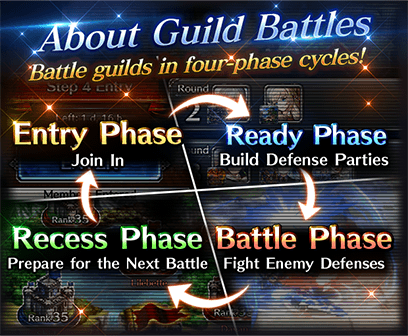
In the official release of Guild Battle, the ready phase will be extended from one day to two days, and a one-day recess phase will be added after the end of the battle phase.
▼Guild Battle Cycle
・Beta: Three-day cycle (Entry Phase → Ready Phase → Battle Phase)
・Official version: Five-day cycle (Entry Phase → Ready Phase (two days) → Battle Phase → Recess Phase)
■ About the Recess Phase
During the recess phase, you can view the battle-phase map of the previous guild battle and review and replay the battles that happened.
This will help players be able to review and prepare for the next battle.
■ About the Party Presets Feature
Now, you'll always be able to edit your party presets, even outside of the ready phase.
Also, we have adjusted the UI to make it more difficult to overwrite party presets when empty.
▼Accessing Party Presets
・Go to the main Guild screen > [MANAGE] > [Party Presets]
*As previously, you can also edit presets during the ready phase on the dedicated guild battle map by following the instructions below.
・Go to the dedicated guild battle map and then tap your fort > [EDIT] > [Use Preset].
■ About Adjustments to AI Behavior
Regarding units set with magic, many players mentioned that the AI would not cast magic, even when a unit had sufficient MP.
In the Guild Battle official release, we've made adjustments so that the AI is more likely to cast magic when able.
However, please note that the AI does not always prioritize magic.
We also plan to make further occasional adjustments to the balancing of battles after guild battle is released.
■ Fort Skins Released
Fort skins allow you to change the appearance of your fort.
When you change your fort skin, it will be visible to other players, so set the skin you are most proud of during guild battles!
Fort Skin Examples
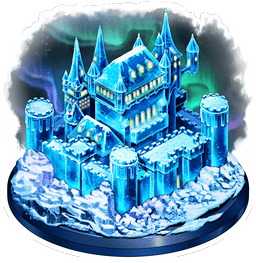
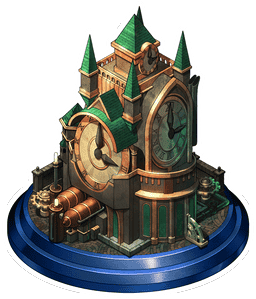
You can also get fort skins from the following locations:
・Season Rankings Rewards
・Crimson Ore Trading Space
・Shop (Paid Crystals only)
*We plan to add other types of skins and places to get them.
■ Season Rankings Released
With the official release of Guild Battle, Season Rankings will also be released.
Check About Season Rankings for more details.
About Guild Battles
Guild battles are game content that you play with your guildmates. After entry, your guild is matched against another guild, which you then battle over a period of approximately three days!
Guild battles take place on a dedicated guild battle map and are fought using the units and arks you have for multiple rounds.
Guild battles are divided into four phases. Every season, each phase takes place on a predetermined schedule.
■ Schedule
| Name | Example Schedule |
|---|---|
|
Cycle 1 Entry Phase |
Apr 1, 8:00 am - Apr 2, 7:59 am (PDT) |
|
Matchmaking Period (no action required) |
Apr 2, 8:00 am - Apr 2, 11:59 am (PDT) |
| Ready Phase | Apr 2, 12:00 pm - Apr 4, 7:59 am (PDT) |
| Battle Phase | Apr 4, 8:00 am - Apr 5, 7:59 am (PDT) |
| Tally Period (no action required) | Apr 5, 8:00 am - Apr 5, 11:59 am (PDT) |
| Recess Phase | Apr 5, 12:00 pm - Apr 6, 7:59 am (PDT) |
| Cycle 2 Entry Phase | Apr 6, 8:00 am - Apr 7, 7:59 am (PDT) |
| The above schedule repeats at this point. | ・・・ |
One cycle spans from the start of the entry phase until the end of the recess phase, and there are eight cycles in one season.
After eight cycles have completed, a break period will be set for multiple days. This break period will consist of the ready phase for the next season and the recess phase.
*For only the first battle after the official release of Guild Battle, the entry period will be from Sep 28, 8:00 am (PT) to Oct 1, 7:59 am (PT).
■ About Forts and Rounds
In guild battle, you attack and defend bases called forts.
Participating players create defense parties to defend their forts, while aiming to attack and capture the forts of the opposing guild.
Also, battles in guild battle consist of four rounds.
| Round | Max Number of Defense Units |
|---|---|
| 1 | 1 |
| 2 | 2 |
| 3 | 3 |
| 4 | 4 |
You will earn victory points for each round you overcome.
The guild that earns the most victory points during the battle phase wins.
Entry Phase
Entry into a guild battle requires ten or more members of the guild to participate.
Note that the maximum number of participants is twenty.
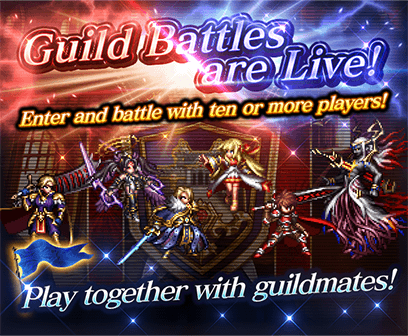
To enter, go to the main Guild screen, tap [GUILD BATTLE], and then tap [ENTER].
If the number of guild members who have entered the guild battle is nine or less, entry will be automatically cancelled.
Once the entry phase ends, you enter the matchmaking phase. Once the matchmaking phase ends, you enter the ready phase.
Ready Phase
Once you are in the ready phase, each guild is assigned twenty forts on the dedicated guild battle map.
Forts are assigned to each member of the guild.
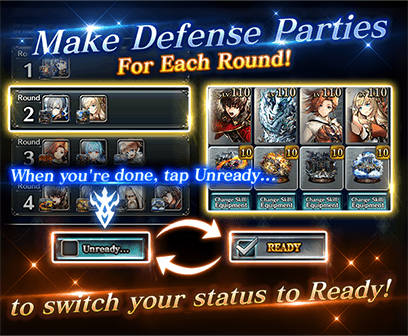
By tapping the fort(s) you were assigned, you can then build your defense parties.
Even outside of the ready phase, you can use the following steps to edit your party presets:
→Go to the main Guild screen > [MANAGE] > [Party Presets]
By tapping [Make Attack Party] at the bottom of the guild battle map, you can also create an attack party to use in the battle phase.
*Attack parties can also be created during the battle phase.
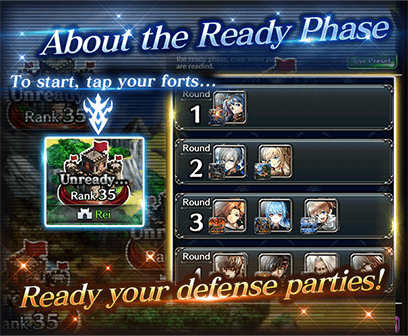
The units that can be set in forts differs depending on the round.
As the number of rounds increases by one, the number of units that can be set in a party also increases by one.
In guild battle, shift units are treated as separate units.
For example, you can use Kyle the Swordsman in your round 1 party and then use Knight Lord Kyle in your round 2 party.
On the guild battle map, you can tap on your guildmates' forts to see which units and arks they have set in their defense parties.
■ Important Notes
- Units/ arks/ equipment used in defense parties cannot be used in attack parties. Keep the number of units and arks you have in mind when creating parties.
- You also have the option to not set any units in your defense parties.
If you don't set any units, an NPC Pokkle will take part in the battle.
However, this Pokkle will lose almost immediately, so your opponents will be able to easily gain victory points. You don't want to forget to set defense parties. - The number of forts doesn't change, regardless of the number of players who've entered the battle.
Forts are assigned one by one to each player, and any remaining forts are assigned in order of player rank from highest to lowest.
Ex.) If the number of players who have entered the guild battle is ten, each player will be assigned two forts.
Battle Phase
During the battle phase, each guild will be given forty attacks left, and those attacks will be distributed between the entered guild members.
The total number of attacks left will not change, regardless of the number of entered players, and will be divided evenly among the number of players participating.
Attack the opposing guild's forts using the number of attacks left given to you!
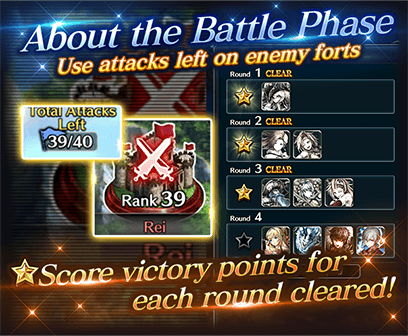
You can't see the defense units set in the forts you can attack until the battle starts.
But if a guildmate attacks a fort, you will be able to see the units set in the defense party for each round that has been fought.
Once the battle ends, round progress will be shared with your guildmates, and the next attack will start from the last round that the previous attacker progressed to.
Work together with your guildmates to figure out your opponents' parties and capture their forts.
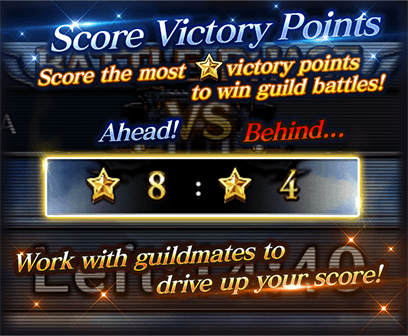
Wins and losses in guild battle are determined by number of victory points gained by the number of rounds your guild was able to clear when attacking the opposing guild's forts.
The guild that earns the most victory points is the winner.
Work together with your guildmates to get the most amount of victory points!
Once the battle phase ends, you will then move to the tally period to determine which guild won or lost the guild battle.
About Guild Battle Rules
■ Guild Battle Features
Battles in guild battle differ from regular quest battles in the following ways:
- Battles consist of four rounds instead of waves.
- Battles in guild battle are fought on Auto, and can't be switched to Manual. As such, summoning stones and ark skills can't be used.
- Battles have a time limit.
- Defeating the defender's set units in each round will allow you to move onto the next round.
The battle ends when all your units are incapacitated or when the time limit runs out.
- Your progress at the end of the battle will be shared with your guildmates, and the next attack's battle will begin from where your progress previously ended.
- Ex. 1) If the battle ended in Round 2 because the time limit ran out, the next attack will start from Round 2.
- Ex. 2) If all your units were incapacitated in Round 2, the next attack will start from Round 2.
- Damage balancing differs from regular quests.
- SCT is not carried over between rounds and is reset at the end of the round.
- Units start battle with 5 MP and automatically recover MP during battle.
*MP recovery speed differs from that of arena. - Skills that activate at Battle Start (Wave Start) will only activate at the start of the first round you take on.
Ex.) Charge skills, Quick Trigger, Fast Critical, ark traits, etc.
*These skills activate each round for the defender. - Skills that activate at Battle End (Wave End) won't activate at the end of a round.
Ex.) The skill Pirate's Feast won't have any effect, as it activates at Battle End (Wave End). - Effects that reset at Battle End (Wave End) won't reset at the end of a round.
- Buffs and debuffs reset at the end of a round.
Only when the attacking party wins a round do buffs and debuffs given by an ally unit carry over to the next round. - Boss effects and effects that are disabled in arena are also disabled in guild battles.
Ex.) The skill Death God, the equipment Death Bringer, etc. - For the defender, units that were incapacitated during previous battles will not revive.
However, any of the defender's units that survive will reset to their state at the start of the previous battle. - Revival skills that activate at Battle Start if a unit is incapacitated (Reincarnation) won't activate, as any units incapacitated when defending are treated as exempt from battle.
Topics

- The defense parties of the fort attacked up to the last round reached will be visible for all of your guildmates.
- Be sure to make use of your guild chat!
The information revealed by attacking a fort will give you a bigger range of strategies. - Replays of battles in guild battle can be viewed from the Battle Log.
- Prepare for your next guild battle with the party presets feature.
For convenience, you can save up to two defense parties!
・Go to the main Guild screen > [MANAGE] > [Party Presets]
・Go to the dedicated guild battle map and then tap your fort > [EDIT] > [Use Preset]
You can set party presets using the above two methods.
About Season Rankings
There are season rankings that are tallied each season for guild battles.
These rankings are for guilds that have played at least one guild battle during that month; any guilds that fulfill the ranking conditions are automatically entered.
In season rankings, guilds compete for victory points based on the numbers of wins/ losses and forts captured during guild battles throughout the season.
The season rankings reset each season.
You can check the current season ranking by going to the Guild screen, and tapping [RANKING], and then [Season Ranking].
- Top Guilds
Here you can see the top ten guilds in the season ranking. - Your Guild
Here you can see your guild's rank in the season rankings.
You can also check your guildmates' activity, such as how many times they have entered guild battles with your guild, or how many victory points they have scored. Activity from any past guilds is not reflected. - Battle Log
Here you can check the midseason battle results.
Higher-ranking battle results are added to the Ancient Library, where you can see past rankings.
Only the top ten ranking guilds are added to the Ancient Library.
You can check each guild's past ranking by tapping [Guild Info].
About Rewards
There are the following two types of rewards for guild battles:
■ Play Rewards
With each entry into a guild battle, all guild members who enter will receive play rewards.
Play rewards are distributed after each guild battle's battle phase has ended.
■ Ranking Rewards
Ranking rewards are distributed after a season has ended, based on the season ranking results.
Ranking rewards are also distributed to unentered guild members.
Also, be aware that you can't receive ranking rewards if you aren't a member of that guild when rewards are distributed.
The following rewards are set as rewards for the season rankings.
| Rank | Rewards |
|---|---|
|
#1 |
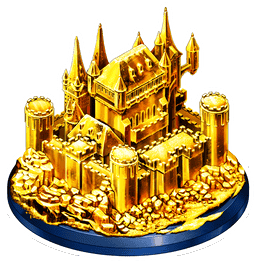
Fort Skin: Gold, Trophy (Gold), Guild Coin x300 |
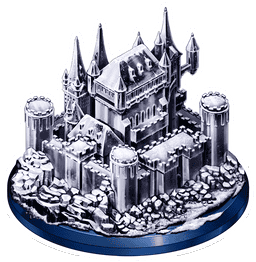
| #2 | Fort Skin: Silver, Trophy (Silver), Guild Coin x250 |
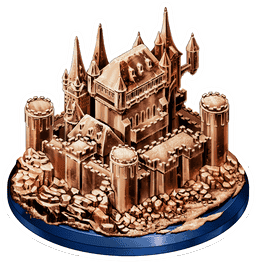
| #3 | Fort Skin: Bronze, Trophy (Bronze), Guild Coin x200 |
| #4 - #10 | Trophy (Mini), Guild Coin x150 |
| #11 - #80 | Guild Coin x100 |
| #81 - #150 | Guild Coin x75 |
| #151 - | Guild Coin x50 |
Fort Skin: Gold, Silver, Bronze
Trophies
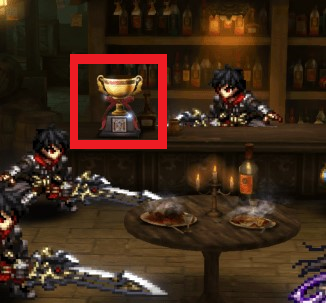
If you win a trophy, it will be displayed on the guild top screen for the next season.
Please check Help for further details.
We appreciate your continued support of Last Cloudia.
The Last Cloudia Team